






What is IT automation?
IT automation uses software to replace or reduce human effort on repetitive IT tasks. Automated systems trigger actions based on defined rules, schedules, or AI-driven decisions rather than requiring an operator to manually run scripts or follow a checklist. Closely related terms include IT process automation (ITPA) and IT operations automation. It covers everything from single-task actions like patching a server or restarting a service to full-lifecycle workflows where a system detects an incident, correlates alerts, routes a ticket, executes a remediation runbook, and closes the loop without human involvement.
Why IT automation matters at enterprise scale
Alert volumes and infrastructure complexity have grown beyond what any team can manage by hand. End users still report 65% of all incidents before monitoring tools catch them, which means real problems slip through until a customer notices. The downstream effects are slower resolution times, alert fatigue, and tribal knowledge that leaves when senior engineers do.
Types of IT automation
Seven categories cover most of what enterprise IT teams automate:
- Infrastructure automation (provisioning, configuration, patching)
- Network automation (device configuration, policy enforcement)
- ITSM automation (ticket routing, SLA tracking, change workflows)
- Runbook automation (service restarts, scripted remediation, rollbacks)
- IT security automation (vulnerability scanning, compliance checks)
- Monitoring and event automation (alert correlation, deduplication, noise reduction)
- Incident response automation (triage, escalation routing, resolution workflows)
How IT automation works: a step-by-step overview
IT process automation follows a consistent operational flow regardless of the tool or platform.
1. Data collection
The system ingests signals from monitoring tools, logs, APM platforms, and infrastructure telemetry. More signal sources mean better context, as long as the system can correlate them rather than pass the volume through to an operator.
2. Event correlation
Related alerts get grouped into a single incident record, cutting the noise that would otherwise reach an operator. Without this step, one real problem generates dozens of redundant notifications.
3. Rule or model evaluation
The system checks the correlated event against rules (if X then Y) or against an AI model that reasons over context, history, and current conditions. Rules-based systems are fast but brittle. AI-driven systems handle ambiguity.
4. Automated action or escalation
The system executes a remediation script, routes a ticket to the right team, or escalates based on confidence level and defined thresholds. It acts automatically on high-confidence decisions and sends uncertain ones to a human with full context attached.
5. Feedback and learning
Outcomes feed back into the system. Resolved incidents, closed tickets, and operator corrections all improve future decisions, turning daily operations into a source of institutional knowledge.
IT automation vs. IT orchestration: key differences
| Dimension | IT automation | IT orchestration |
|---|---|---|
| Definition | Executes individual IT tasks automatically | Coordinates multiple automated tasks across systems into a workflow |
| Scope | Single-task or single-system | Cross-system, end-to-end workflow |
| Trigger mechanism | Rule, schedule, or event | Workflow logic across multiple automation steps |
| Example use case | Restart a failed service | Provision a new environment: create VM, configure network, deploy app, run tests |
| Relationship | The building block | The coordination layer |
Orchestration doesn’t replace automation. It coordinates it. You can’t orchestrate tasks that haven’t been automated first.
IT automation vs. traditional AIOps: what’s the difference?
| Dimension | IT automation | Traditional AIOps |
|---|---|---|
| Core function | Executes predefined tasks based on rules or scripts | Applies machine learning to correlate events and surface insights |
| Data requirements | Requires clean, structured, predefined inputs | Ingests data from many sources, but accuracy depends on data quality and CMDB completeness |
| Decision model | Static rules, fixed conditions | Pattern detection across historical and real-time data |
| Action scope | Executes the task it was told to run | Surfaces insights and recommends actions, with humans or predefined workflows deciding what runs |
See AIOps for a full definition and how it relates to IT automation.
The limits of rules-based IT automation
Rules-based automation works well for stable, predictable environments. Modern enterprise infrastructure is neither.
- Rules require clean, structured data. Hybrid cloud, microservices, and legacy systems rarely deliver that.
- Static rules break as infrastructure changes, triggering false positives or missing incidents entirely after a migration.
- Rules-based systems have no way to learn from operational experience. Every script stays exactly as good as the day someone wrote it.
- Rules can’t reason about context, so they escalate everything or nothing.
Enterprise Management Associates (EMA) found in a 2023 survey that 43% of respondents named prioritization and routing as the phase of incident management most in need of improvement, and 52% named team engagement and collaboration. Both point to automation that lacks context.
IT automation use cases in enterprise IT operations
Where enterprise IT automation delivers the most operational value:
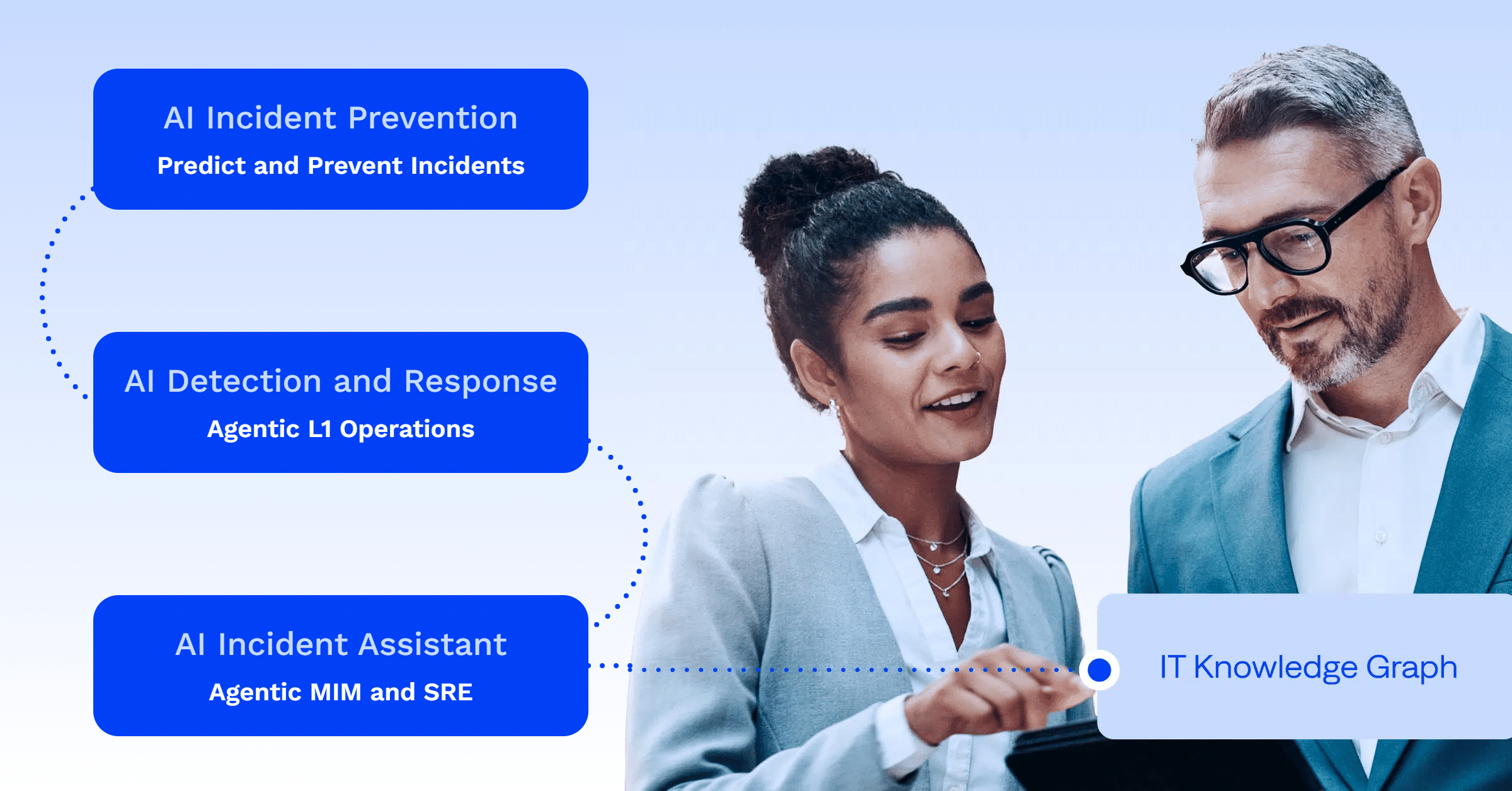
- Incident detection and response: Correlating alerts from multiple monitoring tools into a single incident record cuts mean time to detect and reduces escalation delays. (AI Detection and Response)
- Change risk analysis: Scoring changes against past incidents and environment-specific patterns before they ship prevents outages rather than reacting to them. (AI Incident Prevention)
- L1 ticket handling: Resolving known, repetitive incidents automatically frees L1 teams for work that requires judgment. (L1 Agent)
- Major incident management: Automating routing, notifications, and status updates during P0/P1 incidents reduces coordination overhead when it matters most. (AI Incident Assistant)
From rules to reasoning: how agentic IT automation works
Rules-based automation asks whether an event matches a known condition. Agentic IT automation asks what is actually happening and what to do about it.
Workflow automation sequences predefined steps across tools, such as routing a ticket, requesting an approval, or notifying a team. Runbook automation executes a documented operational procedure when a specific condition fires. Agentic ITOps goes a step further: AI agents reason over operational context to decide which action fits, act within defined guardrails, and escalate when judgment is needed. See Runbook automation and L1 automation for how each works in practice. For the full framework, see Agentic ITOps.
Proven results from enterprise IT automation
Across 23 customers assessed in The Business Value of the BigPanda Platform report (November 2024 to July 2025): average ROI of 430% with payback in under a year, average annual benefits of $2.85 million, and ticket volume reductions ranging from 10% to 87% (median 43%). Named results include 99% alert compression at Bungie and 83% of alerts automated at Cambia Health Solutions.
Frequently asked questions about IT automation
What is the difference between IT automation and IT orchestration?
IT automation executes individual tasks automatically, such as restarting a service or provisioning a server. IT orchestration coordinates multiple automated tasks across systems into a complete workflow. Orchestration depends on automation as its building block.
What is IT process automation (ITPA)?
ITPA is often used interchangeably with IT automation and IT operations automation, though it usually refers more specifically to IT service workflows and administrative tasks. That includes ticket routing, approvals, escalations, and service restarts, all aimed at reducing manual overhead.
How does AI change IT automation?
Rules-based automation follows a static path: if X, then Y. AI-driven automation reasons over context, history, and current conditions to decide what to do and whether to escalate. It handles messy, incomplete data and improves over time as it learns from operational outcomes.
What is an IT automation platform?
An IT automation platform is an integrated system that provides the data foundation, AI reasoning layer, and full-lifecycle coverage needed to automate IT operations at enterprise scale. A true platform covers prevention, detection and response, L1 resolution, and major incident management on a single shared data layer, rather than automating isolated tasks with disconnected point tools.
What is the difference between IT automation and AIOps?
IT automation executes predefined tasks based on rules or scripts. Traditional AIOps applies machine learning to correlate events and surface insights. See AIOps and Agentic ITOps for the full comparison.
Check out more related content

PLATFORM
Reduce MTTR with intelligent IT Automation
Automatically respond to incidents, remediate issues, and orchestrate complex IT workflows at scale with BigPanda’s AIOps platform.